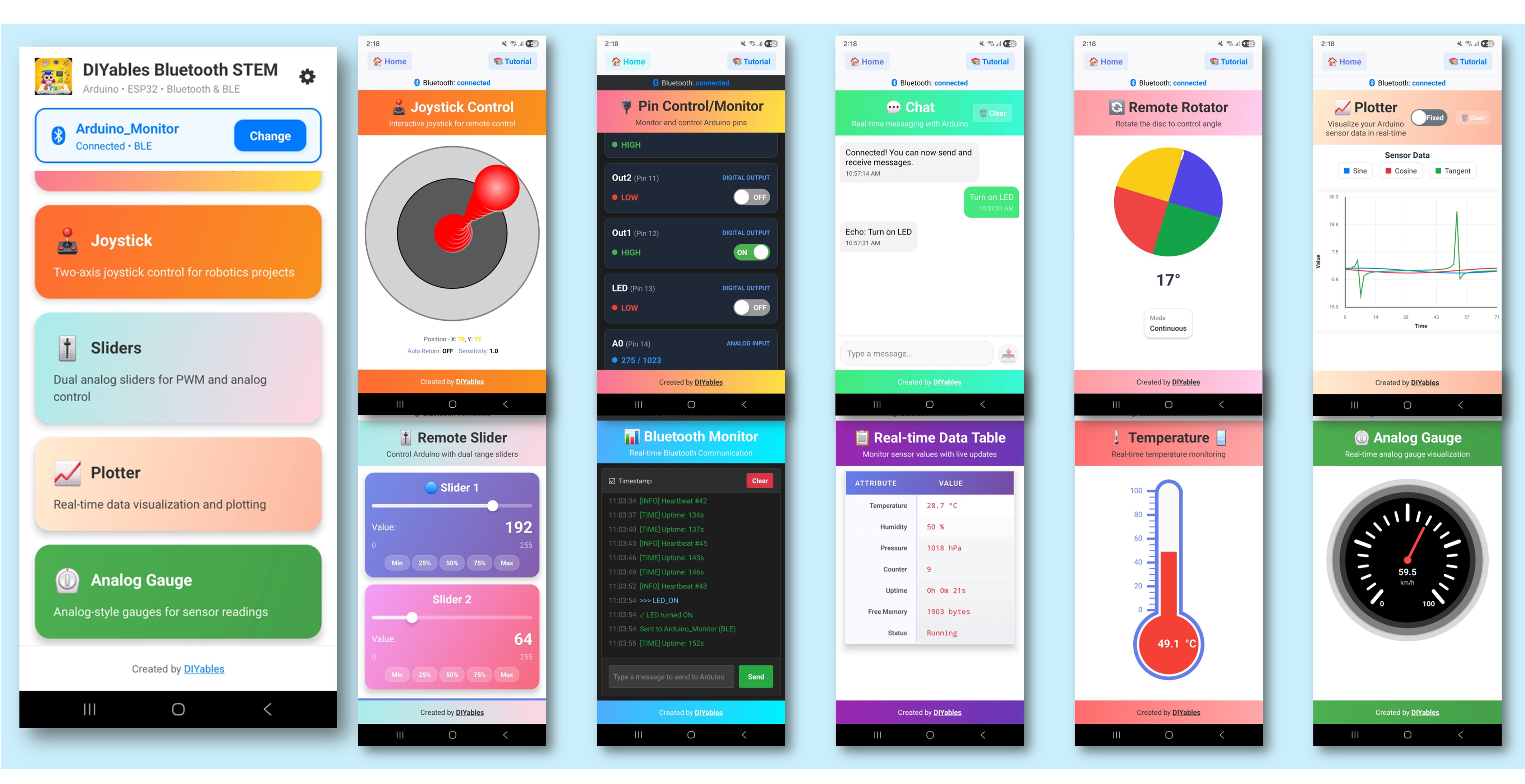
ESP32 - DIYables Bluetooth App Multiple Apps

Overview

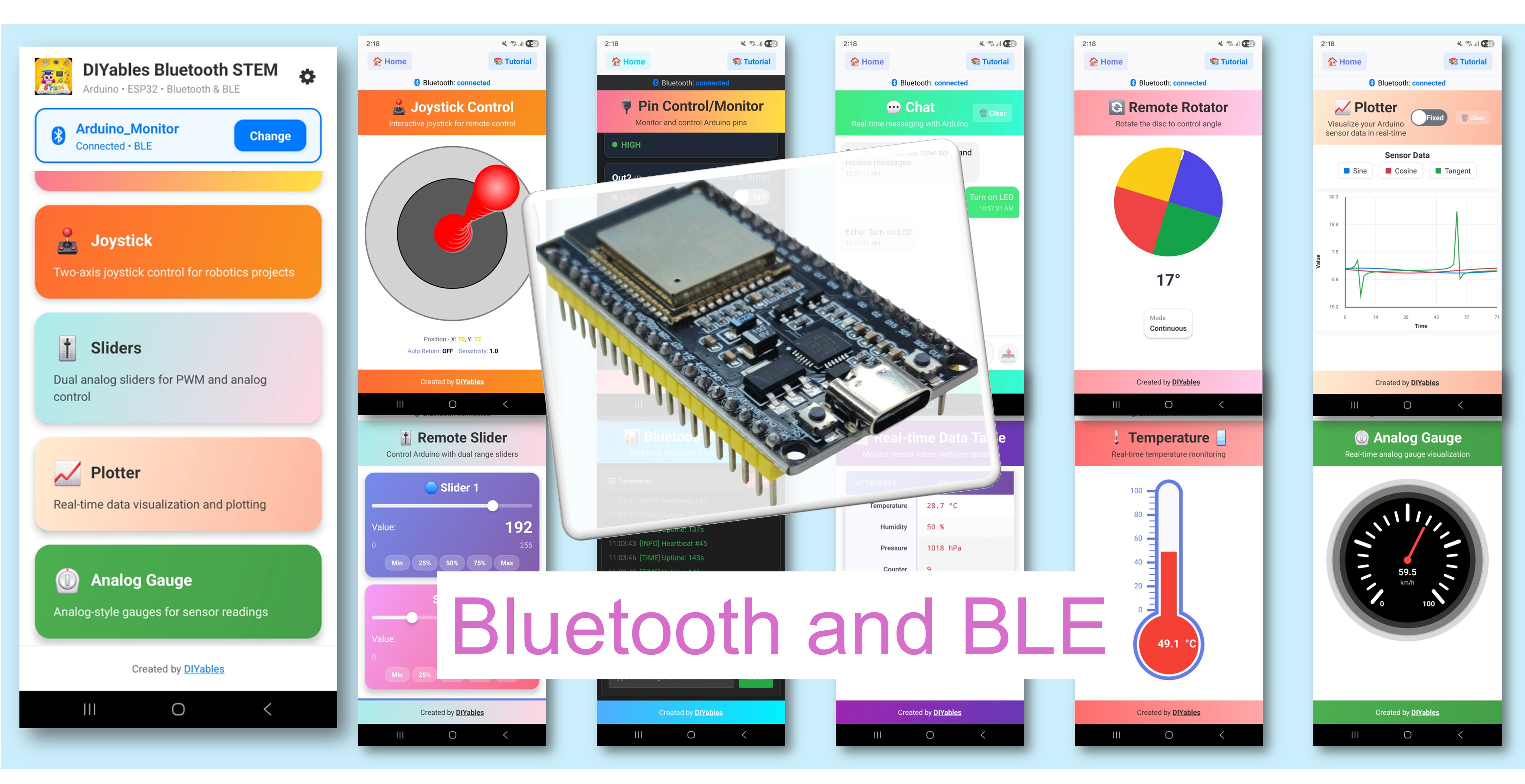
The Multiple Bluetooth Apps example demonstrates how to combine multiple Bluetooth app interfaces into a single ESP32 project. Run Monitor, Chat, Slider, Joystick, Temperature, Plotter, Table, Analog Gauge, and Rotator all at once — accessible through the DIYables Bluetooth STEM app. Designed for ESP32 boards with support for both BLE (Bluetooth Low Energy) and Classic Bluetooth connections. This is ideal for complex projects that need multiple control and display interfaces simultaneously.

This example supports two Bluetooth modes:

  • ESP32 BLE (Bluetooth Low Energy): Works on both Android and iOS
  • ESP32 Classic Bluetooth: Works on Android only. iOS does not support Classic Bluetooth. Use BLE if you need iOS support.
ESP32 Bluetooth Multiple Apps Example - Combine All Bluetooth Apps in One Project Tutorial

Features

  • 9 Apps in One: Monitor, Chat, Slider, Joystick, Temperature, Plotter, Table, Analog Gauge, and Rotator running simultaneously
  • Independent Callbacks: Each app has its own event handlers
  • Independent Timing: Different update intervals for each app
  • App Switching: Switch between apps freely in the mobile app
  • BLE & Classic Bluetooth: Choose the Bluetooth mode that suits your project
  • Cross-Platform: BLE mode works on both Android and iOS; Classic Bluetooth works on Android
  • Low Power Option: BLE mode consumes less power than Classic Bluetooth

Hardware Used In This Tutorial

1×ESP-WROOM-32 Dev Module
1×Alternatively, ESP32 Uno-form board
1×Alternatively, ESP32 S3 Uno-form board
1×USB Cable Type-A to Type-C (for USB-A PC)
1×USB Cable Type-C to Type-C (for USB-C PC)
1×Breadboard
1×Jumper Wires
1×Recommended: Screw Terminal Expansion Board for ESP32
1×Recommended: Breakout Expansion Board for ESP32
1×Recommended: Power Splitter for ESP32

Or you can buy the following kits:

1×DIYables ESP32 Starter Kit (ESP32 included)
1×DIYables Sensor Kit (18 sensors/displays)
Disclosure: Some of the links in this section are Amazon affiliate links, meaning we may earn a commission at no additional cost to you if you make a purchase through them. Additionally, some links direct you to products from our own brand, DIYables .

ESP32 Code

Quick Instructions

Follow these instructions step by step:

  • If this is your first time using the ESP32, refer to the tutorial on setting up the environment for ESP32 in the Arduino IDE.
  • Connect the ESP32 board to your computer using a USB cable.
  • Launch the Arduino IDE on your computer.
  • Select the appropriate ESP32 board and COM port.
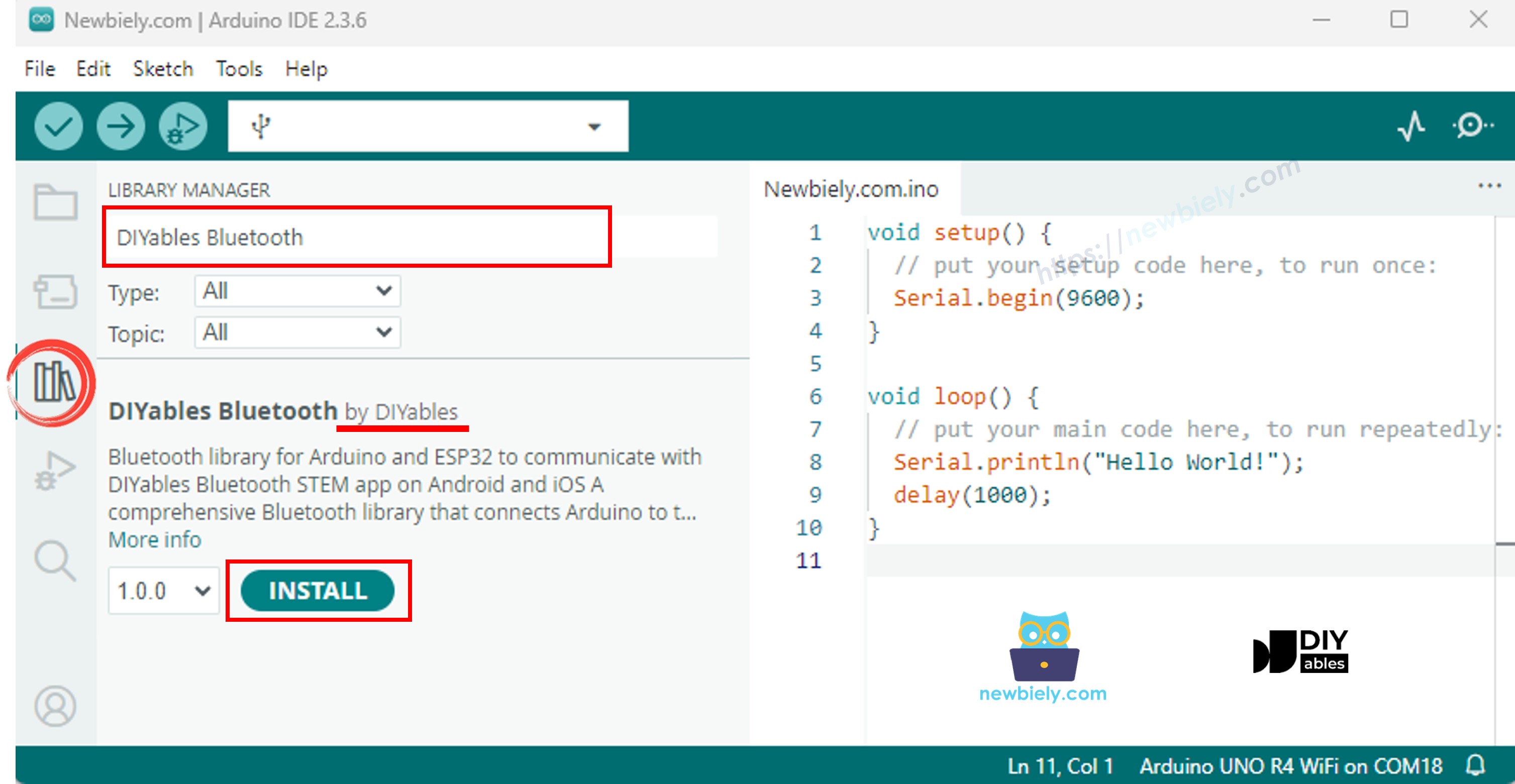
  • Navigate to the Libraries icon on the left bar of the Arduino IDE.
  • Search "DIYables Bluetooth", then find the DIYables Bluetooth library by DIYables
  • Click Install button to install the library.
ESP32 DIYables Bluetooth library
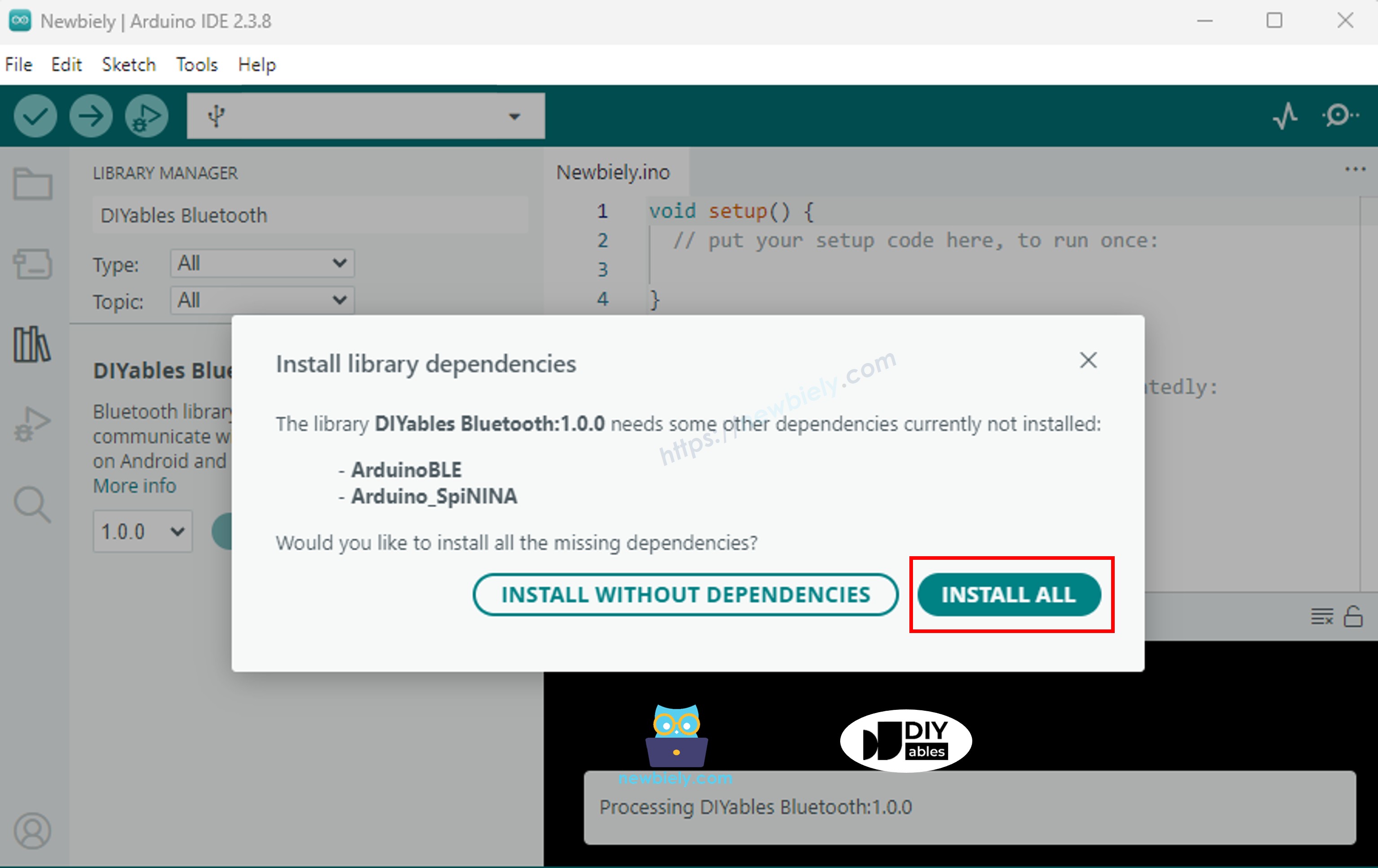
  • You will be asked for installing some other library dependencies
  • Click Install All button to install all library dependencies.
ESP32 DIYables Bluetooth dependency

> Important: Since this example includes many Bluetooth app libraries, the compiled sketch is larger than usual. You must select the correct partition scheme (see below).

Choose one of the two Bluetooth modes below depending on your needs:

ESP32 Classic Bluetooth Code (works with app on Android only)

Note: Classic Bluetooth is NOT supported on iOS. If you need iOS support, use the BLE code below.

  • On Arduino IDE, Go to File Examples DIYables Bluetooth Esp32Bluetooth_MultipleApps example, or copy the above code and paste it to the editor of Arduino IDE
/* * DIYables Bluetooth Library - ESP32 Classic Bluetooth Multiple Apps Example * Works with DIYables Bluetooth STEM app on Android * Note: Classic Bluetooth is NOT supported on iOS. Use BLE examples for iOS support. * * This example demonstrates how to use multiple Bluetooth apps simultaneously: * - Monitor: Real-time serial monitoring and logging * - Chat: Bi-directional text messaging * - Slider: Dual slider control (0-255 range) * - Joystick: Interactive joystick control (X, Y coordinates) * - Temperature: Temperature monitoring and display * - Plotter: Real-time data plotting (3 channels) * - Table: Two-column data table with real-time updates * - Analog Gauge: Circular gauge for sensor monitoring * - Rotator: Rotatable disc/knob control * - Pin Control: Digital pin control and monitoring * * Features: * - All apps run simultaneously on a single Bluetooth connection * - Automatic message routing to appropriate app handlers * - Simplified callback system - no manual parsing needed * - All Bluetooth protocol details handled by the library * - Compatible with DIYables Bluetooth Mobile App * * Compatible Boards: * - ESP32 (all variants with Classic Bluetooth) * - ESP32-WROOM-32 * - ESP32-DevKitC * - ESP32-WROVER * * Note: Select "Huge APP (3MB No OTA/1MB SPIFFS)" partition scheme * in Arduino IDE: Tools > Partition Scheme * * Setup: * 1. Upload the sketch to your ESP32 * 2. Open Serial Monitor (115200 baud) * 3. Open DIYables Bluetooth App on your phone * 4. Connect to "ESP32 Multi-App" * 5. Navigate to different screens to test each app * * Tutorial: https://diyables.io/bluetooth-app * Author: DIYables */ #include <DIYables_BluetoothServer.h> #include <DIYables_BluetoothMonitor.h> #include <DIYables_BluetoothChat.h> #include <DIYables_BluetoothSlider.h> #include <DIYables_BluetoothJoystick.h> #include <DIYables_BluetoothTemperature.h> #include <DIYables_BluetoothPlotter.h> #include <DIYables_BluetoothTable.h> #include <DIYables_BluetoothAnalogGauge.h> #include <DIYables_BluetoothRotator.h> #include <platforms/DIYables_Esp32Bluetooth.h> // Create Bluetooth instances DIYables_Esp32Bluetooth bluetooth("ESP32 Multi-App"); DIYables_BluetoothServer bluetoothServer(bluetooth); // Create app instances DIYables_BluetoothMonitor bluetoothMonitor; DIYables_BluetoothChat bluetoothChat; DIYables_BluetoothSlider bluetoothSlider(0, 255, 1); DIYables_BluetoothJoystick bluetoothJoystick(false, 5); DIYables_BluetoothTemperature bluetoothTemperature(-10.0, 50.0, "°C"); DIYables_BluetoothPlotter bluetoothPlotter; DIYables_BluetoothTable bluetoothTable; DIYables_BluetoothAnalogGauge bluetoothGauge(0.0, 100.0, "%"); DIYables_BluetoothRotator bluetoothRotator(ROTATOR_MODE_CONTINUOUS); // ESP32 built-in LED (may vary by board) const int LED_PIN = 2; // State variables int currentSlider1 = 128; int currentSlider2 = 64; int currentJoystickX = 0; int currentJoystickY = 0; float currentTemperature = 25.0; float currentGaugeValue = 50.0; float currentRotatorAngle = 0.0; int messageCount = 0; // Timing variables unsigned long lastMonitorUpdate = 0; unsigned long lastTempUpdate = 0; unsigned long lastPlotUpdate = 0; unsigned long lastTableUpdate = 0; unsigned long lastGaugeUpdate = 0; float plotPhase = 0; void setup() { Serial.begin(115200); delay(1000); Serial.println("DIYables Bluetooth - ESP32 Multiple Apps Example"); // Initialize built-in LED pinMode(LED_PIN, OUTPUT); digitalWrite(LED_PIN, LOW); // Initialize Bluetooth server bluetoothServer.begin(); // Register all apps with the server bluetoothServer.addApp(&bluetoothMonitor); bluetoothServer.addApp(&bluetoothChat); bluetoothServer.addApp(&bluetoothSlider); bluetoothServer.addApp(&bluetoothJoystick); bluetoothServer.addApp(&bluetoothTemperature); bluetoothServer.addApp(&bluetoothPlotter); bluetoothServer.addApp(&bluetoothTable); bluetoothServer.addApp(&bluetoothGauge); bluetoothServer.addApp(&bluetoothRotator); Serial.print("Registered apps: "); Serial.println(bluetoothServer.getAppCount()); // Configure Plotter bluetoothPlotter.setPlotTitle("Sensor Data"); bluetoothPlotter.setAxisLabels("Time", "Value"); bluetoothPlotter.setYAxisRange(-1.5, 1.5); bluetoothPlotter.setMaxSamples(100); bluetoothPlotter.setLegendLabels("Sine", "Cosine", "Random"); // Configure Table rows bluetoothTable.addRow("Status"); bluetoothTable.addRow("Uptime"); bluetoothTable.addRow("Slider 1"); bluetoothTable.addRow("Slider 2"); bluetoothTable.addRow("Joystick X"); bluetoothTable.addRow("Joystick Y"); bluetoothTable.addRow("Temperature"); bluetoothTable.addRow("Gauge Value"); bluetoothTable.addRow("Rotator Angle"); bluetoothTable.addRow("Free Heap"); // Set up all callbacks setupCallbacks(); Serial.println("Waiting for Bluetooth connection..."); } void setupCallbacks() { // ---- Connection events ---- bluetoothServer.setOnConnected([]() { Serial.println("Bluetooth connected!"); digitalWrite(LED_PIN, HIGH); bluetoothMonitor.send("=== ESP32 Multi-App Connected ==="); bluetoothMonitor.send("All apps are ready!"); bluetoothChat.send("Hello! ESP32 Multi-App is connected."); }); bluetoothServer.setOnDisconnected([]() { Serial.println("Bluetooth disconnected!"); digitalWrite(LED_PIN, LOW); }); // ---- Monitor callbacks ---- bluetoothMonitor.onMonitorMessage([](const String& message) { Serial.println("Monitor cmd: " + message); if (message == "HELP") { bluetoothMonitor.send("Commands: STATUS, HELP, LED_ON, LED_OFF, HEAP"); } else if (message == "STATUS") { bluetoothMonitor.send("Slider1=" + String(currentSlider1) + " Slider2=" + String(currentSlider2)); bluetoothMonitor.send("Joystick X=" + String(currentJoystickX) + " Y=" + String(currentJoystickY)); bluetoothMonitor.send("Temp=" + String(currentTemperature, 1) + "°C"); bluetoothMonitor.send("Gauge=" + String(currentGaugeValue, 1) + "%"); bluetoothMonitor.send("Rotator=" + String(currentRotatorAngle, 0) + "°"); } else if (message == "LED_ON") { digitalWrite(LED_PIN, HIGH); bluetoothMonitor.send("LED turned ON"); } else if (message == "LED_OFF") { digitalWrite(LED_PIN, LOW); bluetoothMonitor.send("LED turned OFF"); } else if (message == "HEAP") { bluetoothMonitor.send("Free Heap: " + String(ESP.getFreeHeap()) + " bytes"); } else { bluetoothMonitor.send("Unknown: " + message + " (type HELP)"); } }); // ---- Chat callbacks ---- bluetoothChat.onChatMessage([](const String& message) { Serial.println("Chat: " + message); bluetoothChat.send("Echo: " + message); if (message.equalsIgnoreCase("ping")) { bluetoothChat.send("pong!"); } else if (message.equalsIgnoreCase("status")) { bluetoothChat.send("Uptime: " + String(millis() / 1000) + "s, Apps: " + String(bluetoothServer.getAppCount())); } else if (message.equalsIgnoreCase("heap")) { bluetoothChat.send("Free heap: " + String(ESP.getFreeHeap()) + " bytes"); } }); // ---- Slider callbacks ---- bluetoothSlider.onSliderValue([](int slider1, int slider2) { currentSlider1 = slider1; currentSlider2 = slider2; Serial.print("Slider 1: "); Serial.print(slider1); Serial.print(", Slider 2: "); Serial.println(slider2); // Update gauge based on slider 1 currentGaugeValue = map(slider1, 0, 255, 0, 100); bluetoothGauge.send(currentGaugeValue); // Update table bluetoothTable.sendValueUpdate("Slider 1", String(slider1)); bluetoothTable.sendValueUpdate("Slider 2", String(slider2)); bluetoothTable.sendValueUpdate("Gauge Value", String(currentGaugeValue, 1) + "%"); }); bluetoothSlider.onGetConfig([]() { bluetoothSlider.send(currentSlider1, currentSlider2); }); // ---- Joystick callbacks ---- bluetoothJoystick.onJoystickValue([](int x, int y) { currentJoystickX = x; currentJoystickY = y; Serial.print("Joystick X: "); Serial.print(x); Serial.print(", Y: "); Serial.println(y); // Update table bluetoothTable.sendValueUpdate("Joystick X", String(x)); bluetoothTable.sendValueUpdate("Joystick Y", String(y)); }); bluetoothJoystick.onGetConfig([]() { bluetoothJoystick.send(currentJoystickX, currentJoystickY); }); // ---- Temperature callbacks ---- bluetoothTemperature.onTemperatureRequest([]() { bluetoothTemperature.send(currentTemperature); }); // ---- Plotter callbacks ---- bluetoothPlotter.onDataRequest([]() { Serial.println("Plotter data requested"); }); // ---- Table callbacks ---- bluetoothTable.onDataRequest([]() { Serial.println("Table data requested"); bluetoothTable.sendTableStructure(); updateAllTableValues(); }); // ---- Gauge callbacks ---- bluetoothGauge.onValueRequest([]() { bluetoothGauge.send(currentGaugeValue); }); // ---- Rotator callbacks ---- bluetoothRotator.onRotatorAngle([](float angle) { currentRotatorAngle = angle; Serial.print("Rotator: "); Serial.print(angle); Serial.println("°"); bluetoothTable.sendValueUpdate("Rotator Angle", String(angle, 0) + "°"); }); } void updateAllTableValues() { bluetoothTable.sendValueUpdate("Status", "Running"); unsigned long uptime = millis() / 1000; String uptimeStr; if (uptime >= 60) { uptimeStr = String(uptime / 60) + "m " + String(uptime % 60) + "s"; } else { uptimeStr = String(uptime) + "s"; } bluetoothTable.sendValueUpdate("Uptime", uptimeStr); bluetoothTable.sendValueUpdate("Slider 1", String(currentSlider1)); bluetoothTable.sendValueUpdate("Slider 2", String(currentSlider2)); bluetoothTable.sendValueUpdate("Joystick X", String(currentJoystickX)); bluetoothTable.sendValueUpdate("Joystick Y", String(currentJoystickY)); bluetoothTable.sendValueUpdate("Temperature", String(currentTemperature, 1) + " °C"); bluetoothTable.sendValueUpdate("Gauge Value", String(currentGaugeValue, 1) + "%"); bluetoothTable.sendValueUpdate("Rotator Angle", String(currentRotatorAngle, 0) + "°"); bluetoothTable.sendValueUpdate("Free Heap", String(ESP.getFreeHeap()) + " bytes"); } void loop() { bluetoothServer.loop(); if (!bluetooth.isConnected()) { delay(10); return; } // ---- Monitor: periodic status every 5 seconds ---- if (millis() - lastMonitorUpdate >= 5000) { lastMonitorUpdate = millis(); messageCount++; bluetoothMonitor.send("[INFO] Heartbeat #" + String(messageCount) + " - Uptime: " + String(millis() / 1000) + "s"); } // ---- Temperature: update every 2 seconds ---- if (millis() - lastTempUpdate >= 2000) { lastTempUpdate = millis(); // Simulate temperature with slight variation static float tempOffset = 0; tempOffset += random(-10, 11) / 10.0; if (tempOffset > 5.0) tempOffset = 5.0; if (tempOffset < -5.0) tempOffset = -5.0; currentTemperature = 25.0 + tempOffset; bluetoothTemperature.send(currentTemperature); bluetoothTable.sendValueUpdate("Temperature", String(currentTemperature, 1) + " °C"); } // ---- Plotter: update every 100ms ---- if (millis() - lastPlotUpdate >= 100) { lastPlotUpdate = millis(); float sine = sin(plotPhase); float cosine = cos(plotPhase); float noise = random(-50, 51) / 100.0; bluetoothPlotter.send(sine, cosine, noise); plotPhase += 0.1; if (plotPhase > 2 * PI) plotPhase = 0; } // ---- Table: update uptime every 5 seconds ---- if (millis() - lastTableUpdate >= 5000) { lastTableUpdate = millis(); unsigned long uptime = millis() / 1000; String uptimeStr; if (uptime >= 60) { uptimeStr = String(uptime / 60) + "m " + String(uptime % 60) + "s"; } else { uptimeStr = String(uptime) + "s"; } bluetoothTable.sendValueUpdate("Uptime", uptimeStr); bluetoothTable.sendValueUpdate("Free Heap", String(ESP.getFreeHeap()) + " bytes"); } // ---- Gauge: simulate sensor every 3 seconds ---- if (millis() - lastGaugeUpdate >= 3000) { lastGaugeUpdate = millis(); float sensorValue = 50.0 + 30.0 * sin(millis() / 10000.0); currentGaugeValue = sensorValue; bluetoothGauge.send(currentGaugeValue); bluetoothTable.sendValueUpdate("Gauge Value", String(currentGaugeValue, 1) + "%"); } delay(10); }
  • Important: Go to Tools > Partition Scheme and select "Huge APP (3MB No OTA/1MB SPIFFS)". This is required because the multiple apps example uses significantly more flash space.
  • Click Upload button on Arduino IDE to upload code to ESP32
  • Open the Serial Monitor
  • Check out the result on Serial Monitor. It looks like the below:
COM6
Send
DIYables Bluetooth - ESP32 Multiple Apps Example Waiting for Bluetooth connection...
Autoscroll Show timestamp
Clear output
9600 baud  
Newline  

ESP32 BLE Code (works with app on both Android and iOS)

  • On Arduino IDE, Go to File Examples DIYables Bluetooth Esp32BLE_MultipleApps example, or copy the above code and paste it to the editor of Arduino IDE
/* * DIYables Bluetooth Library - ESP32 BLE Multiple Apps Example * Works with DIYables Bluetooth STEM app on Android and iOS * * This example demonstrates how to use multiple Bluetooth apps simultaneously: * - Monitor, Chat, Slider, Joystick, Temperature, Plotter, * Table, Analog Gauge, Rotator * * Compatible Boards: * - ESP32-WROOM-32 * - ESP32-DevKitC * - ESP32-WROVER * - ESP32-S3 * - ESP32-C3 * - Any ESP32 board supporting BLE * * Note: Select "Huge APP (3MB No OTA/1MB SPIFFS)" partition scheme * in Arduino IDE: Tools > Partition Scheme * * Setup: * 1. Upload the sketch to your ESP32 * 2. Open Serial Monitor (115200 baud) * 3. Open DIYables Bluetooth App on your phone * 4. Connect to "ESP32BLE Multi-App" * 5. Navigate to different screens to test each app * * Tutorial: https://diyables.io/bluetooth-app * Author: DIYables */ #include <DIYables_BluetoothServer.h> #include <DIYables_BluetoothMonitor.h> #include <DIYables_BluetoothChat.h> #include <DIYables_BluetoothSlider.h> #include <DIYables_BluetoothJoystick.h> #include <DIYables_BluetoothTemperature.h> #include <DIYables_BluetoothPlotter.h> #include <DIYables_BluetoothTable.h> #include <DIYables_BluetoothAnalogGauge.h> #include <DIYables_BluetoothRotator.h> #include <platforms/DIYables_Esp32BLE.h> // BLE Configuration const char* DEVICE_NAME = "ESP32BLE Multi-App"; const char* SERVICE_UUID = "19B10000-E8F2-537E-4F6C-D104768A1214"; const char* TX_UUID = "19B10001-E8F2-537E-4F6C-D104768A1214"; const char* RX_UUID = "19B10002-E8F2-537E-4F6C-D104768A1214"; // Create Bluetooth instances DIYables_Esp32BLE bluetooth(DEVICE_NAME, SERVICE_UUID, TX_UUID, RX_UUID); DIYables_BluetoothServer bluetoothServer(bluetooth); // Create app instances DIYables_BluetoothMonitor bluetoothMonitor; DIYables_BluetoothChat bluetoothChat; DIYables_BluetoothSlider bluetoothSlider(0, 255, 1); DIYables_BluetoothJoystick bluetoothJoystick(false, 5); DIYables_BluetoothTemperature bluetoothTemperature(-10.0, 50.0, "°C"); DIYables_BluetoothPlotter bluetoothPlotter; DIYables_BluetoothTable bluetoothTable; DIYables_BluetoothAnalogGauge bluetoothGauge(0.0, 100.0, "%"); DIYables_BluetoothRotator bluetoothRotator(ROTATOR_MODE_CONTINUOUS); // State variables int currentSlider1 = 128; int currentSlider2 = 64; int currentJoystickX = 0; int currentJoystickY = 0; float currentTemperature = 25.0; float currentGaugeValue = 50.0; float currentRotatorAngle = 0.0; int messageCount = 0; // Timing variables unsigned long lastMonitorUpdate = 0; unsigned long lastTempUpdate = 0; unsigned long lastPlotUpdate = 0; unsigned long lastTableUpdate = 0; unsigned long lastGaugeUpdate = 0; float plotPhase = 0; void setup() { Serial.begin(115200); delay(1000); Serial.println("DIYables Bluetooth - ESP32 BLE Multiple Apps Example"); pinMode(2, OUTPUT); digitalWrite(2, LOW); bluetoothServer.begin(); bluetoothServer.addApp(&bluetoothMonitor); bluetoothServer.addApp(&bluetoothChat); bluetoothServer.addApp(&bluetoothSlider); bluetoothServer.addApp(&bluetoothJoystick); bluetoothServer.addApp(&bluetoothTemperature); bluetoothServer.addApp(&bluetoothPlotter); bluetoothServer.addApp(&bluetoothTable); bluetoothServer.addApp(&bluetoothGauge); bluetoothServer.addApp(&bluetoothRotator); Serial.print("Registered apps: "); Serial.println(bluetoothServer.getAppCount()); bluetoothPlotter.setPlotTitle("Sensor Data"); bluetoothPlotter.setAxisLabels("Time", "Value"); bluetoothPlotter.setYAxisRange(-1.5, 1.5); bluetoothPlotter.setMaxSamples(100); bluetoothPlotter.setLegendLabels("Sine", "Cosine", "Random"); bluetoothTable.addRow("Status"); bluetoothTable.addRow("Uptime"); bluetoothTable.addRow("Slider 1"); bluetoothTable.addRow("Slider 2"); bluetoothTable.addRow("Joystick X"); bluetoothTable.addRow("Joystick Y"); bluetoothTable.addRow("Temperature"); bluetoothTable.addRow("Gauge Value"); bluetoothTable.addRow("Rotator Angle"); bluetoothTable.addRow("Messages"); setupCallbacks(); Serial.println("Waiting for Bluetooth connection..."); } void setupCallbacks() { bluetoothServer.setOnConnected([]() { Serial.println("Bluetooth connected!"); digitalWrite(2, HIGH); bluetoothMonitor.send("=== ESP32 BLE Multi-App Connected ==="); bluetoothMonitor.send("All apps are ready!"); bluetoothChat.send("Hello! ESP32 BLE Multi-App is connected."); }); bluetoothServer.setOnDisconnected([]() { Serial.println("Bluetooth disconnected!"); digitalWrite(2, LOW); }); bluetoothMonitor.onMonitorMessage([](const String& message) { Serial.println("Monitor cmd: " + message); if (message == "HELP") { bluetoothMonitor.send("Commands: STATUS, HELP, LED_ON, LED_OFF, HEAP"); } else if (message == "STATUS") { bluetoothMonitor.send("Slider1=" + String(currentSlider1) + " Slider2=" + String(currentSlider2)); bluetoothMonitor.send("Joystick X=" + String(currentJoystickX) + " Y=" + String(currentJoystickY)); bluetoothMonitor.send("Temp=" + String(currentTemperature, 1) + "°C"); bluetoothMonitor.send("Gauge=" + String(currentGaugeValue, 1) + "%"); bluetoothMonitor.send("Rotator=" + String(currentRotatorAngle, 0) + "°"); } else if (message == "LED_ON") { digitalWrite(2, HIGH); bluetoothMonitor.send("LED turned ON"); } else if (message == "LED_OFF") { digitalWrite(2, LOW); bluetoothMonitor.send("LED turned OFF"); } else if (message == "HEAP") { bluetoothMonitor.send("Free heap: " + String(ESP.getFreeHeap()) + " bytes"); } else { bluetoothMonitor.send("Unknown: " + message + " (type HELP)"); } }); bluetoothChat.onChatMessage([](const String& message) { Serial.println("Chat: " + message); bluetoothChat.send("Echo: " + message); if (message.equalsIgnoreCase("ping")) { bluetoothChat.send("pong!"); } else if (message.equalsIgnoreCase("status")) { bluetoothChat.send("Uptime: " + String(millis() / 1000) + "s, Apps: " + String(bluetoothServer.getAppCount())); } }); bluetoothSlider.onSliderValue([](int slider1, int slider2) { currentSlider1 = slider1; currentSlider2 = slider2; Serial.print("Slider 1: "); Serial.print(slider1); Serial.print(", Slider 2: "); Serial.println(slider2); currentGaugeValue = map(slider1, 0, 255, 0, 100); bluetoothGauge.send(currentGaugeValue); bluetoothTable.sendValueUpdate("Slider 1", String(slider1)); bluetoothTable.sendValueUpdate("Slider 2", String(slider2)); bluetoothTable.sendValueUpdate("Gauge Value", String(currentGaugeValue, 1) + "%"); }); bluetoothSlider.onGetConfig([]() { bluetoothSlider.send(currentSlider1, currentSlider2); }); bluetoothJoystick.onJoystickValue([](int x, int y) { currentJoystickX = x; currentJoystickY = y; Serial.print("Joystick X: "); Serial.print(x); Serial.print(", Y: "); Serial.println(y); bluetoothTable.sendValueUpdate("Joystick X", String(x)); bluetoothTable.sendValueUpdate("Joystick Y", String(y)); }); bluetoothJoystick.onGetConfig([]() { bluetoothJoystick.send(currentJoystickX, currentJoystickY); }); bluetoothTemperature.onTemperatureRequest([]() { bluetoothTemperature.send(currentTemperature); }); bluetoothPlotter.onDataRequest([]() { Serial.println("Plotter data requested"); }); bluetoothTable.onDataRequest([]() { Serial.println("Table data requested"); bluetoothTable.sendTableStructure(); updateAllTableValues(); }); bluetoothGauge.onValueRequest([]() { bluetoothGauge.send(currentGaugeValue); }); bluetoothRotator.onRotatorAngle([](float angle) { currentRotatorAngle = angle; Serial.print("Rotator: "); Serial.print(angle); Serial.println("°"); bluetoothTable.sendValueUpdate("Rotator Angle", String(angle, 0) + "°"); }); } void updateAllTableValues() { bluetoothTable.sendValueUpdate("Status", "Running"); unsigned long uptime = millis() / 1000; String uptimeStr; if (uptime >= 60) { uptimeStr = String(uptime / 60) + "m " + String(uptime % 60) + "s"; } else { uptimeStr = String(uptime) + "s"; } bluetoothTable.sendValueUpdate("Uptime", uptimeStr); bluetoothTable.sendValueUpdate("Slider 1", String(currentSlider1)); bluetoothTable.sendValueUpdate("Slider 2", String(currentSlider2)); bluetoothTable.sendValueUpdate("Joystick X", String(currentJoystickX)); bluetoothTable.sendValueUpdate("Joystick Y", String(currentJoystickY)); bluetoothTable.sendValueUpdate("Temperature", String(currentTemperature, 1) + " °C"); bluetoothTable.sendValueUpdate("Gauge Value", String(currentGaugeValue, 1) + "%"); bluetoothTable.sendValueUpdate("Rotator Angle", String(currentRotatorAngle, 0) + "°"); bluetoothTable.sendValueUpdate("Messages", String(messageCount)); } void loop() { bluetoothServer.loop(); if (!bluetooth.isConnected()) { delay(10); return; } if (millis() - lastMonitorUpdate >= 5000) { lastMonitorUpdate = millis(); messageCount++; bluetoothMonitor.send("[INFO] Heartbeat #" + String(messageCount) + " - Uptime: " + String(millis() / 1000) + "s"); } if (millis() - lastTempUpdate >= 2000) { lastTempUpdate = millis(); static float tempOffset = 0; tempOffset += random(-10, 11) / 10.0; if (tempOffset > 5.0) tempOffset = 5.0; if (tempOffset < -5.0) tempOffset = -5.0; currentTemperature = 25.0 + tempOffset; bluetoothTemperature.send(currentTemperature); bluetoothTable.sendValueUpdate("Temperature", String(currentTemperature, 1) + " °C"); } if (millis() - lastPlotUpdate >= 100) { lastPlotUpdate = millis(); float sine = sin(plotPhase); float cosine = cos(plotPhase); float noise = random(-50, 51) / 100.0; bluetoothPlotter.send(sine, cosine, noise); plotPhase += 0.1; if (plotPhase > 2 * PI) plotPhase = 0; } if (millis() - lastTableUpdate >= 5000) { lastTableUpdate = millis(); unsigned long uptime = millis() / 1000; String uptimeStr; if (uptime >= 60) { uptimeStr = String(uptime / 60) + "m " + String(uptime % 60) + "s"; } else { uptimeStr = String(uptime) + "s"; } bluetoothTable.sendValueUpdate("Uptime", uptimeStr); bluetoothTable.sendValueUpdate("Messages", String(messageCount)); } if (millis() - lastGaugeUpdate >= 3000) { lastGaugeUpdate = millis(); float sensorValue = 50.0 + 30.0 * sin(millis() / 10000.0); currentGaugeValue = sensorValue; bluetoothGauge.send(currentGaugeValue); bluetoothTable.sendValueUpdate("Gauge Value", String(currentGaugeValue, 1) + "%"); } delay(10); }
  • Important: Go to Tools > Partition Scheme and select "Huge APP (3MB No OTA/1MB SPIFFS)". This is required because the multiple apps example uses significantly more flash space.
  • Click Upload button on Arduino IDE to upload code to ESP32
  • Open the Serial Monitor
  • Check out the result on Serial Monitor. It looks like the below:
COM6
Send
DIYables Bluetooth - ESP32 BLE Multiple Apps Example Waiting for Bluetooth connection...
Autoscroll Show timestamp
Clear output
9600 baud  
Newline  

Mobile App

  • Install the DIYables Bluetooth App on your smartphone: Android | iOS
  • If you are using the ESP32 Classic Bluetooth code, you need to pair the ESP32 with your Android phone before opening the app:
    • Go to your phone's Settings > Bluetooth
    • Make sure Bluetooth is turned on
    • Your phone will scan for available devices
    • Find and tap "ESP32 Multi-App" in the list of available devices
    • Confirm the pairing request (no PIN required)
    • Wait until it shows "Paired" under the device name
  • If you are using the ESP32 BLE code, no pairing is needed. Just proceed to the next step.
  • Open the DIYables Bluetooth App
  • When opening the app for the first time, it will ask for permissions. Please grant the following:
    • Nearby Devices permission (Android 12+) / Bluetooth permission (iOS) - required to scan and connect to Bluetooth devices
    • Location permission (Android 11 and below only) - required by older Android versions to scan for BLE devices
  • Make sure Bluetooth is turned on on your phone
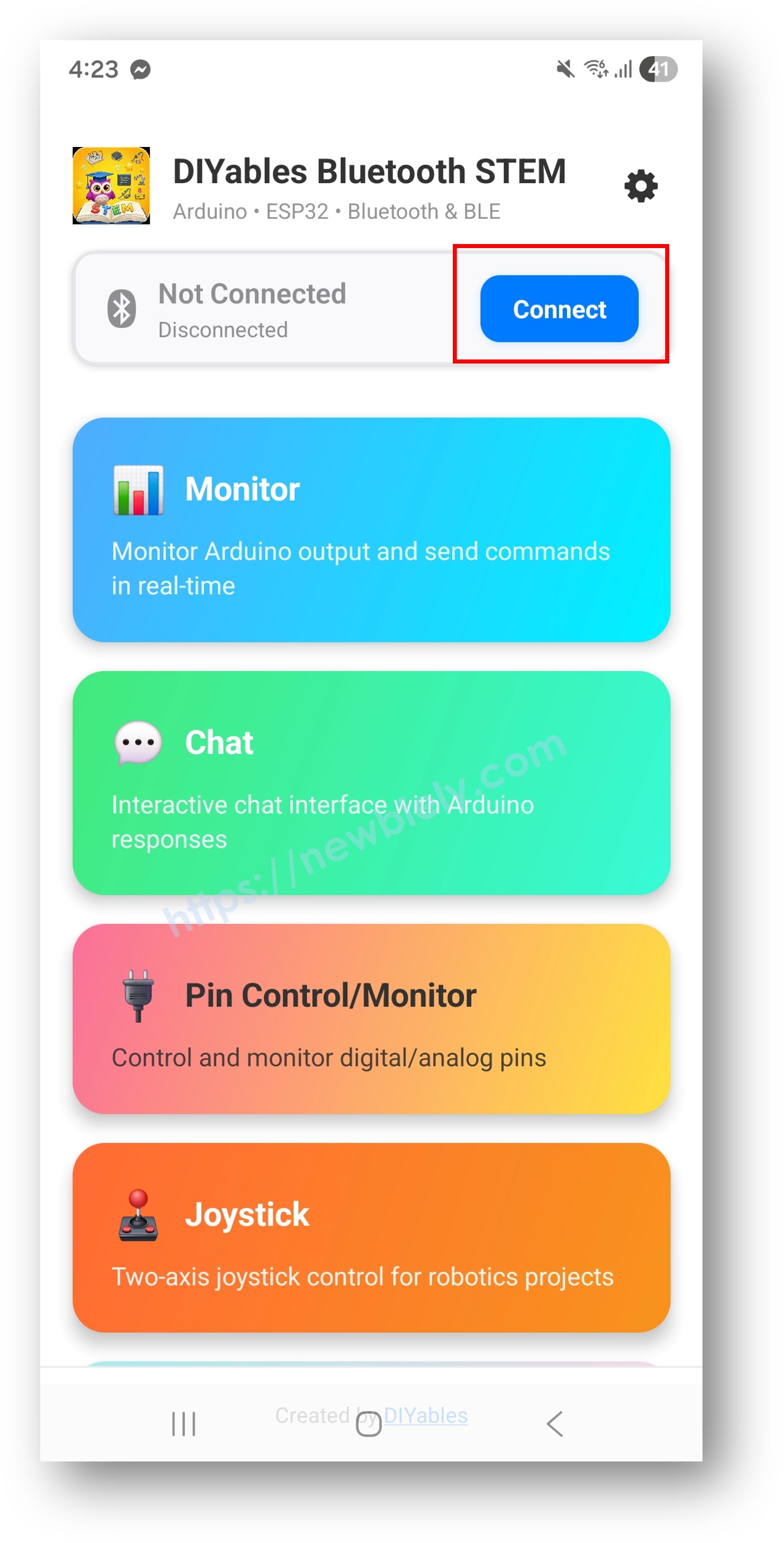
  • On the home screen, tap the Connect button. The app will scan for both BLE and Classic Bluetooth devices.
DIYables Bluetooth App - Home Screen with Scan Button
  • Find and tap your device in the scan results to connect:
    • For Classic Bluetooth: tap "ESP32 Multi-App"
    • For BLE: tap "ESP32BLE Multi-App"
  • Once connected, the app automatically goes back to the home screen. The home screen shows all available apps. The 9 apps initialized in the Arduino code will respond and work — other apps on the home screen will appear but will not function with this sketch.
DIYables Bluetooth App - Home Screen with Multiple Apps

Note: You can tap the settings icon on the home screen to hide/show apps on the home screen. For more details, see the DIYables Bluetooth App User Manual.

  • Tap some of the following apps to open and interact with the ESP32: Monitor, Chat, Slider, Joystick, Temperature, Plotter, Table, Analog Gauge, Rotator
  • Switch between apps freely — they all share the same Bluetooth connection

Now look back at the Serial Monitor on Arduino IDE. You will see:

COM6
Send
Bluetooth connected! Monitor: Uptime: 5s | Free heap: 245780 bytes Temperature: 25.3°C Plotter values sent Table values updated Gauge value: 50.0
Autoscroll Show timestamp
Clear output
9600 baud  
Newline  

Creative Customization - Adapt the Code to Your Project

How Multiple Apps Work

Each app is created as a separate object and registered with the same Bluetooth server. They share the single Bluetooth connection but operate independently:

// Include all app headers #include <DIYables_BluetoothMonitor.h> #include <DIYables_BluetoothChat.h> #include <DIYables_BluetoothSlider.h> #include <DIYables_BluetoothJoystick.h> #include <DIYables_BluetoothTemperature.h> #include <DIYables_BluetoothPlotter.h> #include <DIYables_BluetoothTable.h> #include <DIYables_BluetoothAnalogGauge.h> #include <DIYables_BluetoothRotator.h> // Create app instances DIYables_BluetoothMonitor bluetoothMonitor; DIYables_BluetoothChat bluetoothChat; DIYables_BluetoothSlider bluetoothSlider(0, 100, 1); DIYables_BluetoothJoystick bluetoothJoystick; DIYables_BluetoothTemperature bluetoothTemperature(-10.0, 50.0, "°C"); DIYables_BluetoothPlotter bluetoothPlotter; DIYables_BluetoothTable bluetoothTable; DIYables_BluetoothAnalogGauge bluetoothGauge(0.0, 100.0, "km/h"); DIYables_BluetoothRotator bluetoothRotator(ROTATOR_MODE_LIMITED, 0, 180); // Register all apps with the Bluetooth server bluetoothServer.addApp(bluetoothMonitor); bluetoothServer.addApp(bluetoothChat); bluetoothServer.addApp(bluetoothSlider); bluetoothServer.addApp(bluetoothJoystick); bluetoothServer.addApp(bluetoothTemperature); bluetoothServer.addApp(bluetoothPlotter); bluetoothServer.addApp(bluetoothTable); bluetoothServer.addApp(bluetoothGauge); bluetoothServer.addApp(bluetoothRotator);

Set Up Callbacks for Each App

Each app has its own event handlers:

void setup() { // Monitor - receives text commands bluetoothMonitor.onMonitorMessage([](String message) { Serial.println("Monitor received: " + message); }); // Chat - two-way messaging bluetoothChat.onChatMessage([](String message) { Serial.println("Chat: " + message); bluetoothChat.send("Echo: " + message); }); // Slider - value changes bluetoothSlider.onSliderValue([](int slider1, int slider2) { Serial.println("Slider: " + String(slider1)); }); // Joystick - directional input bluetoothJoystick.onJoystickValue([](int x, int y) { Serial.println("Joystick: X=" + String(x) + " Y=" + String(y)); }); // Rotator - angle changes bluetoothRotator.onRotatorAngle([](float angle) { Serial.println("Rotator: " + String(angle) + "°"); }); }

Independent Update Intervals

Each app can have its own update timing:

void loop() { bluetoothServer.loop(); unsigned long now = millis(); // Monitor: every 5 seconds static unsigned long lastMonitor = 0; if (now - lastMonitor >= 5000) { lastMonitor = now; bluetoothMonitor.send("Uptime: " + String(now / 1000) + "s"); } // Temperature: every 2 seconds static unsigned long lastTemp = 0; if (now - lastTemp >= 2000) { lastTemp = now; bluetoothTemperature.send(readTemperature()); } // Plotter: every 100ms (fast updates for smooth graph) static unsigned long lastPlotter = 0; if (now - lastPlotter >= 100) { lastPlotter = now; bluetoothPlotter.send(readSensorValue()); } // Table: every 5 seconds static unsigned long lastTable = 0; if (now - lastTable >= 5000) { lastTable = now; updateTableValues(); } // Gauge: every 3 seconds static unsigned long lastGauge = 0; if (now - lastGauge >= 3000) { lastGauge = now; bluetoothGauge.send(readGaugeValue()); } delay(10); }

Choose Which Apps to Include

You don't have to include all 9 apps. Choose only the ones you need:

// Example: Only Monitor + Slider + Temperature #include <DIYables_BluetoothMonitor.h> #include <DIYables_BluetoothSlider.h> #include <DIYables_BluetoothTemperature.h> DIYables_BluetoothMonitor bluetoothMonitor; DIYables_BluetoothSlider bluetoothSlider(0, 100, 1); DIYables_BluetoothTemperature bluetoothTemperature(-10.0, 50.0, "°C"); void setup() { // ... Bluetooth server setup ... bluetoothServer.addApp(bluetoothMonitor); bluetoothServer.addApp(bluetoothSlider); bluetoothServer.addApp(bluetoothTemperature); // Only these 3 apps will appear in the mobile app }

Handle Connection Events

bluetoothServer.setOnConnected([]() { Serial.println("Bluetooth connected!"); // Send initial values for all apps bluetoothTemperature.send(currentTemperature); bluetoothGauge.send(currentGaugeValue); bluetoothRotator.send(currentAngle); }); bluetoothServer.setOnDisconnected([]() { Serial.println("Bluetooth disconnected!"); });

How to Use Multiple Apps

App Switching

In the DIYables Bluetooth App:

  • The home screen shows all registered apps as buttons
  • Tap any app to open it
  • Use the back button or home button to return and switch to another app
  • All apps continue running on the ESP32 regardless of which app is shown

Data Flow

  • Input Apps (Slider, Joystick, Rotator, Chat): Send data from phone to ESP32
  • Output Apps (Monitor, Temperature, Plotter, Table, Gauge): Send data from ESP32 to phone
  • Bidirectional Apps (Chat, Monitor): Can send and receive data

Programming Examples

Weather Station Dashboard

// Temperature gauge for main reading DIYables_BluetoothTemperature bluetoothTemperature(-10.0, 50.0, "°C"); // Table for all sensor data DIYables_BluetoothTable bluetoothTable; // Plotter for trend visualization DIYables_BluetoothPlotter bluetoothPlotter; // Monitor for log messages DIYables_BluetoothMonitor bluetoothMonitor; void setup() { // ... Bluetooth setup ... bluetoothTable.addRow("Temperature"); bluetoothTable.addRow("Humidity"); bluetoothTable.addRow("Pressure"); bluetoothTable.addRow("Wind Speed"); bluetoothTable.addRow("Rain"); bluetoothPlotter.setPlotTitle("Weather Trends"); bluetoothPlotter.setLegendLabels("Temp", "Humidity", "Pressure"); } void loop() { bluetoothServer.loop(); static unsigned long lastUpdate = 0; if (millis() - lastUpdate >= 2000) { lastUpdate = millis(); float temp = readTemperature(); float hum = readHumidity(); float press = readPressure(); // Temperature gauge bluetoothTemperature.send(temp); // Table update bluetoothTable.sendValueUpdate("Temperature", String(temp, 1) + " °C"); bluetoothTable.sendValueUpdate("Humidity", String(hum, 0) + "%"); bluetoothTable.sendValueUpdate("Pressure", String(press, 0) + " hPa"); // Plotter bluetoothPlotter.send(temp, hum, press / 10.0); // Monitor log bluetoothMonitor.send("Weather update: " + String(temp, 1) + "°C, " + String(hum, 0) + "%, " + String(press, 0) + "hPa"); } delay(10); }

Robot Controller

// Joystick for movement DIYables_BluetoothJoystick bluetoothJoystick; // Slider for speed limit DIYables_BluetoothSlider bluetoothSlider(0, 100, 5); // Rotator for arm/turret angle DIYables_BluetoothRotator bluetoothRotator(ROTATOR_MODE_LIMITED, 0, 180); // Monitor for status feedback DIYables_BluetoothMonitor bluetoothMonitor; // Gauge for battery level DIYables_BluetoothAnalogGauge bluetoothGauge(0.0, 100.0, "%"); int maxSpeed = 50; void setup() { // ... Bluetooth setup ... bluetoothSlider.onSliderValue([](int slider1, int slider2) { maxSpeed = slider1; bluetoothMonitor.send("Max speed set to: " + String(maxSpeed) + "%"); }); bluetoothJoystick.onJoystickValue([](int x, int y) { int leftMotor = constrain(y + x, -maxSpeed, maxSpeed); int rightMotor = constrain(y - x, -maxSpeed, maxSpeed); setMotors(leftMotor, rightMotor); bluetoothMonitor.send("Motors: L=" + String(leftMotor) + " R=" + String(rightMotor)); }); bluetoothRotator.onRotatorAngle([](float angle) { setArmAngle((int)angle); bluetoothMonitor.send("Arm angle: " + String((int)angle) + "°"); }); } void loop() { bluetoothServer.loop(); // Update battery level every 10 seconds static unsigned long lastBattery = 0; if (millis() - lastBattery >= 10000) { lastBattery = millis(); float battery = readBatteryLevel(); bluetoothGauge.send(battery); } delay(10); }

Home Automation Hub

// Chat for voice/text commands DIYables_BluetoothChat bluetoothChat; // Slider for dimmer/thermostat DIYables_BluetoothSlider bluetoothSlider(0, 100, 1); // Table for device status DIYables_BluetoothTable bluetoothTable; // Temperature for room temp DIYables_BluetoothTemperature bluetoothTemperature(10.0, 40.0, "°C"); // Monitor for activity log DIYables_BluetoothMonitor bluetoothMonitor; void setup() { // ... Bluetooth setup ... bluetoothTable.addRow("Living Room Light"); bluetoothTable.addRow("Bedroom Light"); bluetoothTable.addRow("AC Status"); bluetoothTable.addRow("Door Lock"); bluetoothTable.addRow("Security"); bluetoothChat.onChatMessage([](String message) { message.toLowerCase(); if (message == "lights on") { setLights(true); bluetoothChat.send("Lights turned ON"); bluetoothTable.sendValueUpdate("Living Room Light", "ON ?"); } else if (message == "lights off") { setLights(false); bluetoothChat.send("Lights turned OFF"); bluetoothTable.sendValueUpdate("Living Room Light", "OFF ?"); } else if (message == "status") { bluetoothChat.send("Temp: " + String(readTemperature(), 1) + "°C"); bluetoothChat.send("All systems normal"); } bluetoothMonitor.send("[CMD] " + message); }); bluetoothSlider.onSliderValue([](int slider1, int slider2) { setDimmer(slider1); bluetoothMonitor.send("[DIMMER] Set to " + String(slider1) + "%"); }); }

Advanced Programming Techniques

Cross-App Communication

Use data from one app to update another:

// Joystick controls movement, plotter shows trajectory float posX = 0, posY = 0; bluetoothJoystick.onJoystickValue([](int x, int y) { posX += x * 0.1; posY += y * 0.1; // Plot position on plotter bluetoothPlotter.send(posX, posY); // Show on table bluetoothTable.sendValueUpdate("Position X", String(posX, 1)); bluetoothTable.sendValueUpdate("Position Y", String(posY, 1)); // Log in monitor bluetoothMonitor.send("Pos: (" + String(posX, 1) + ", " + String(posY, 1) + ")"); });

Memory-Efficient Multi-App

When memory is tight, share variables between apps:

// Shared sensor data struct SensorData { float temperature; float humidity; float pressure; unsigned long lastUpdate; } sensorData; void readAllSensors() { sensorData.temperature = readTemperature(); sensorData.humidity = readHumidity(); sensorData.pressure = readPressure(); sensorData.lastUpdate = millis(); } void updateAllApps() { readAllSensors(); // Temperature gauge bluetoothTemperature.send(sensorData.temperature); // Table bluetoothTable.sendValueUpdate("Temperature", String(sensorData.temperature, 1) + " °C"); bluetoothTable.sendValueUpdate("Humidity", String(sensorData.humidity, 0) + "%"); // Plotter bluetoothPlotter.send(sensorData.temperature, sensorData.humidity); // Gauge (pressure) bluetoothGauge.send(sensorData.pressure); // Monitor bluetoothMonitor.send("Sensors updated at " + String(sensorData.lastUpdate / 1000) + "s"); }

BLE vs Classic Bluetooth - Which to Choose?

FeatureBLE (Esp32BLE_MultipleApps)Classic Bluetooth (Esp32Bluetooth_MultipleApps)
iOS Support? Yes? No
Android Support? Yes? Yes
Power ConsumptionLowHigher
Range~30-100m~10-100m
Data RateLowerHigher
Pairing RequiredNo (auto-connect)Yes (manual pairing)
Best ForBattery-powered, cross-platformHigh throughput, Android-only

> Note for Multiple Apps: Since multiple apps send data simultaneously, Classic Bluetooth's higher data rate can be beneficial if you have many fast-updating apps (e.g., plotter at 100ms). For battery-powered projects, BLE is still recommended.

Troubleshooting

Common Issues

1. Cannot find the device in the app

  • Make sure the ESP32 is powered on and the sketch is uploaded
  • For BLE: Ensure your phone's Bluetooth and Location are enabled
  • For Classic Bluetooth: Pair the device first in phone's Bluetooth settings
  • Check that the correct partition scheme is selected (Huge APP) — this is critical for multi-app examples

2. Sketch too large / not enough space

  • In Arduino IDE, go to Tools > Partition Scheme and select "Huge APP (3MB No OTA/1MB SPIFFS)" or "No OTA (Large APP)"
  • The default partition scheme only provides ~1.2MB for app code, which is not enough for the multi-app example
  • This setting gives ~3MB by sacrificing the OTA (over-the-air update) partition
  • If still too large, remove apps you don't need

3. Some apps not appearing in the mobile app

  • Ensure each app is registered with bluetoothServer.addApp()
  • Check that the include headers match the app objects created
  • Verify all apps are registered before bluetoothServer.begin()

4. Data updates are slow or delayed

  • Reduce the number of apps sending data simultaneously
  • Increase update intervals for less critical apps
  • BLE has limited bandwidth — stagger updates across time

5. ESP32 crashes or resets

  • Check available heap memory with ESP.getFreeHeap()
  • Reduce the number of table rows or plotter samples
  • Ensure power supply is adequate (USB 3.0 or external supply)

6. Connection drops frequently

  • Move closer to the ESP32 (reduce distance)
  • Reduce the total amount of data being sent
  • Stagger update intervals so apps don't all send at the same time

Debug Tips

Monitor memory and performance:

void debugMultiApp() { Serial.println("=== Multi-App Debug ==="); Serial.println("Free Heap: " + String(ESP.getFreeHeap()) + " bytes"); Serial.println("Min Free Heap: " + String(ESP.getMinFreeHeap()) + " bytes"); Serial.println("Uptime: " + String(millis() / 1000) + "s"); Serial.println("======================="); } // Call periodically in loop static unsigned long lastDebug = 0; if (millis() - lastDebug >= 30000) { lastDebug = millis(); debugMultiApp(); }

Project Ideas

Comprehensive Dashboards

  • Weather station (Temperature + Table + Plotter + Monitor)
  • Vehicle dashboard (Gauge + Rotator + Plotter + Monitor)
  • Home automation hub (Chat + Slider + Table + Monitor)
  • Lab instrument panel (Temperature + Gauge + Plotter + Table)

Remote Control Systems

  • Robot controller (Joystick + Slider + Rotator + Monitor + Gauge)
  • Drone ground station (Joystick + Table + Plotter + Gauge)
  • CNC machine interface (Slider + Rotator + Monitor + Table)
  • Camera gimbal control (Joystick + Rotator + Monitor)

Educational Projects

  • Physics lab (Plotter + Table + Temperature + Gauge + Monitor)
  • Electronics workbench (Gauge + Plotter + Table + Monitor)
  • Environmental science (Temperature + Plotter + Table + Monitor)
  • Robotics club (Joystick + Slider + Rotator + Monitor + Chat)

IoT Applications

  • Smart greenhouse (Temperature + Slider + Table + Plotter + Monitor)
  • Aquarium controller (Temperature + Slider + Table + Monitor)
  • Solar tracker (Rotator + Gauge + Plotter + Table)
  • Energy monitor (Gauge + Plotter + Table + Monitor)

Next Steps

Now that you've mastered combining multiple Bluetooth apps, you have all the tools to build complex ESP32 projects with rich mobile interfaces. Explore each individual app tutorial for deeper API knowledge:

  1. Bluetooth Monitor - Text-based serial monitor
  2. Bluetooth Chat - Two-way messaging
  3. Bluetooth Slider - Value control with sliders
  4. Bluetooth Joystick - 2D directional input
  5. Bluetooth Temperature - Temperature gauge display
  6. Bluetooth Plotter - Real-time data plotting
  7. Bluetooth Table - Structured data display
  8. Bluetooth Analog Gauge - Analog meter display
  9. Bluetooth Rotator - Rotatable knob control

Support

For additional help:

※ OUR MESSAGES